LumiBot Backtest Tear Sheets and Performance Reports
Reports are enabled by default when a strategy finishes a normal backtest. LumiBot writes an interactive trade chart and this performance report; no custom plotting code is required. See Rich charts are included automatically for output paths and a headless recipe that saves charts without opening a browser.
Note
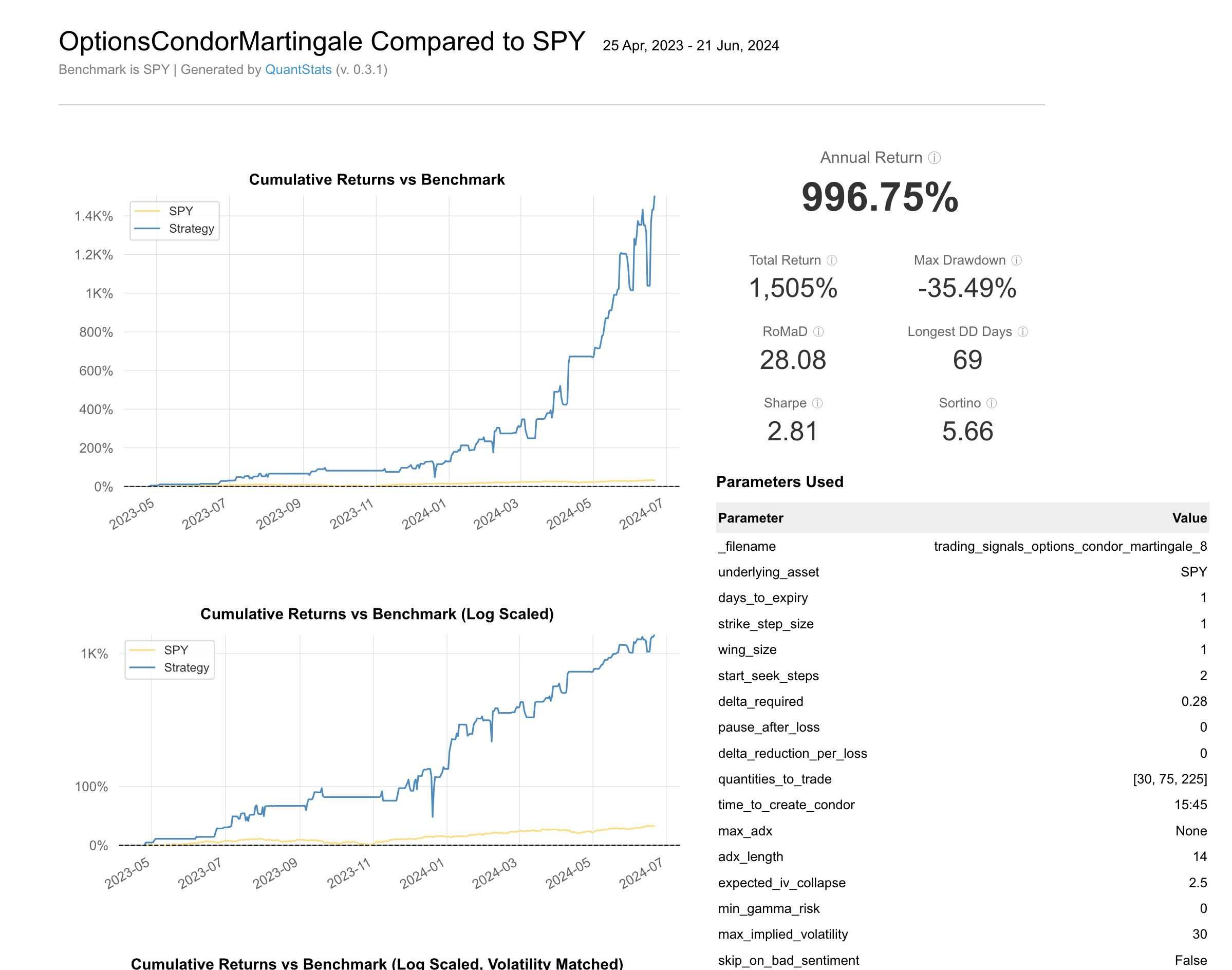
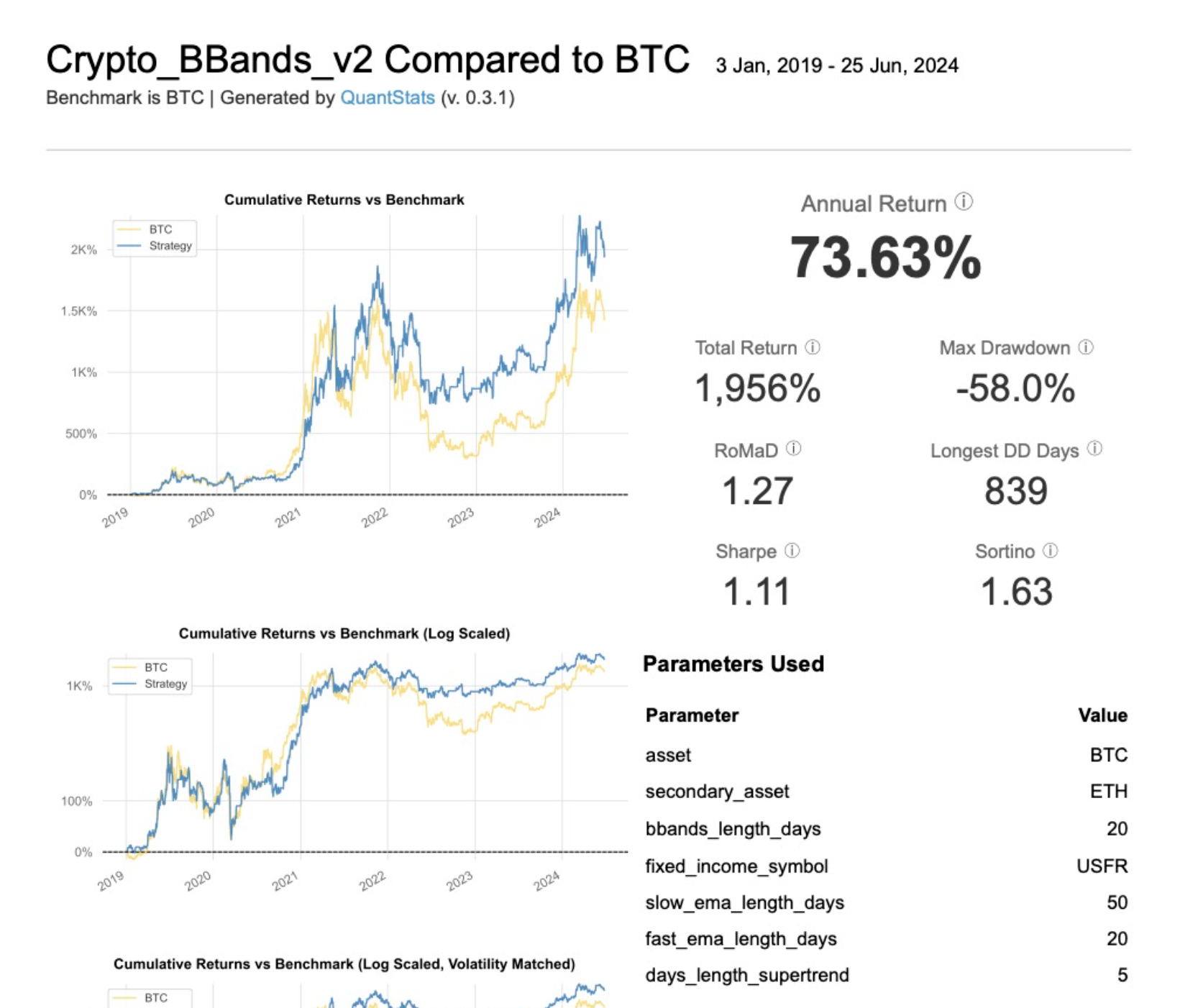
The Tearsheet HTML is one of the most important files generated and is created using the quantstats-lumi library. It includes a variety of metrics such as:
Average Annual Return: The yearly return of the strategy.
Total Return: The overall return from the start to the end of the backtest period. In
*_tearsheet.csvand*_tearsheet_metrics.jsonit is written with two decimals, like the other rows (for example1.67%, not2%). The HTML page keeps the report library’s whole-percent figure.Sharpe Ratio: A measure of risk-adjusted return.
RoMaD (Return over Maximum Drawdown): A ratio that compares return to the maximum drawdown.
Sortino Ratio: A variation of the Sharpe ratio that differentiates harmful volatility from total overall volatility.
Max Drawdown: The maximum observed loss from a peak to a trough of a portfolio, before a new peak is attained.
Longest Drawdown Duration: The longest period during which the portfolio has not reached a new peak.
These metrics are accompanied by various graphs such as:
Cumulative Returns vs Benchmark: Shows the strategy’s cumulative returns compared to a benchmark.
Cumulative Returns (Log Scaled): A log-scaled version of cumulative returns for better visualization of exponential growth.
Machine-readable tearsheet metrics
Alongside *_tearsheet.html, LumiBot also writes *_tearsheet_metrics.json.
This JSON contains summary tearsheet metrics in a machine-readable structure.
It is intended for downstream automation (agents, dashboards, APIs).
You can append strategy-specific metrics by implementing
Strategy.tearsheet_custom_metrics(...).Percentage-style built-in tearsheet metrics are stored as raw decimals in JSON.
The monthly downside row is named
Worst 1-Month Return.The strategy’s own numbers (
Sharpe,Sortino,Max Drawdown,Total Returnand the rest ofscalar_metrics) do not need a benchmark. A backtest run withbenchmark_asset=None, or with a benchmark that has no prices for the tested window, still gets the full report andmetadata.status"ok". Only the comparison is left out, and the file says so:"metadata": {"status": "ok", "benchmark": {"status": "unavailable", "reason": "no_benchmark"}}
reasonisno_benchmark,benchmark_does_not_cover_windoworbenchmark_is_flat. Nobenchmark_scalar_metricsare written in that case, and benchmark returns are never filled in for days it does not have.metadata.status"unavailable"now only means the strategy itself has no usable return series (insufficient_data: no account values;degenerate_returns: the account value never moved, usually zero trades).
Cashflow-adjusted returns
Tearsheet performance now uses the cashflow-adjusted return series from LumiBot stats generation.
That means:
deposits do not create artificial positive performance
withdrawals do not create artificial negative performance
financing, dividends, fees, and trading P&L remain part of strategy performance
For manual inspection of the underlying mechanics, use:
stats.csv/stats.parquetfor the snapshot series and cashflow period columnstrades.csv/trades.parquetfor the discrete event rowstrades.htmlfor the visual overlay of raw portfolio value, cash-adjusted portfolio value, cash, and event markers
Custom metrics workflow
Use Strategy.tearsheet_custom_metrics(...) when you want strategy-defined rows in
both the HTML tearsheet and *_tearsheet_metrics.json.
Example:
class MyStrategy(Strategy):
    def tearsheet_custom_metrics(
        self,
        stats_df,
        strategy_returns,
        benchmark_returns,
        drawdown,
        drawdown_details,
        risk_free_rate,
    ):
        non_null_returns = strategy_returns.dropna()
        avg_dd_days = (
            float(drawdown_details["days"].mean())
            if not drawdown_details.empty and "days" in drawdown_details.columns
            else 0.0
        )
        return {
            "Custom Return Observation Count": int(non_null_returns.shape[0]),
            "Custom Mean Absolute Daily Return": (
                float(non_null_returns.abs().mean()) if not non_null_returns.empty else 0.0
            ),
            "Custom Average Drawdown Days": avg_dd_days,
        }
Design rules:
This is a rare-use feature. Most strategies should not implement custom tearsheet rows.
Custom metrics are literal scalar inserts, not auto-formatted percentage rows.
Prefer unit-clear names and values.
Use scalar values unless you explicitly need strategy/benchmark split output.
If no custom metrics apply, return
{}.For short or degenerate runs, LumiBot still writes a placeholder
*_tearsheet_metrics.jsoninstead of failing.
Release-order note
When the tearsheet metric contract changes:
release
quantstats_lumifirst,update LumiBot’s dependency floor,
validate the released QuantStats package against the local LumiBot source,
only then release LumiBot.
See also: Cash Accounting
Important
These tearsheets showcase different strategies we offer. Each strategy is tailored to achieve specific goals:
Condor Martingale Strategy: Creates an Iron Condor with a defined delta, adjusting quantities based on previous performance. It uses a 1 DTE Iron Condor expiring daily.
Crypto BBands v2 Strategy: Uses Bollinger Bands and exponential moving averages to determine buy and sell points.
Interested in implementing these strategies? BotSpot can help you build, backtest, and run LumiBot strategies from plain English. Start on BotSpot. For questions, use BotSpot’s public support experience.