Agent Built-In Tools
LumiBot agents are useful because they can inspect the same strategy state that your Python code can inspect. Built-in tools are added automatically when an agent is created, so a strategy author does not need to manually wire common market, account, research, memory, or notification tools.
The important design rule is simple:
Research agents can inspect evidence.
Trading agents can inspect evidence and mutate orders.
Backtests expose only data available at the simulated strategy datetime.
Trading Permissions
Use allow_trading=False for any agent that should research, summarize, or
review without changing broker state.
self.agents.create(
    name="researcher",
    model="openai/gpt-6-luna",
    allow_trading=False,
    system_prompt="Gather market data, indicators, news, filings, fundamentals, and macro context.",
)
With allow_trading=False, LumiBot removes tools that mutate orders and the
actual-decision memory write:
submit order
submit multi-leg order
modify order
cancel order
remember decision
Read-only tools remain available. A research agent can still inspect cash, positions, open orders, historical prices, indicators, news, SEC filings, FRED macro data, memory, and notifications.
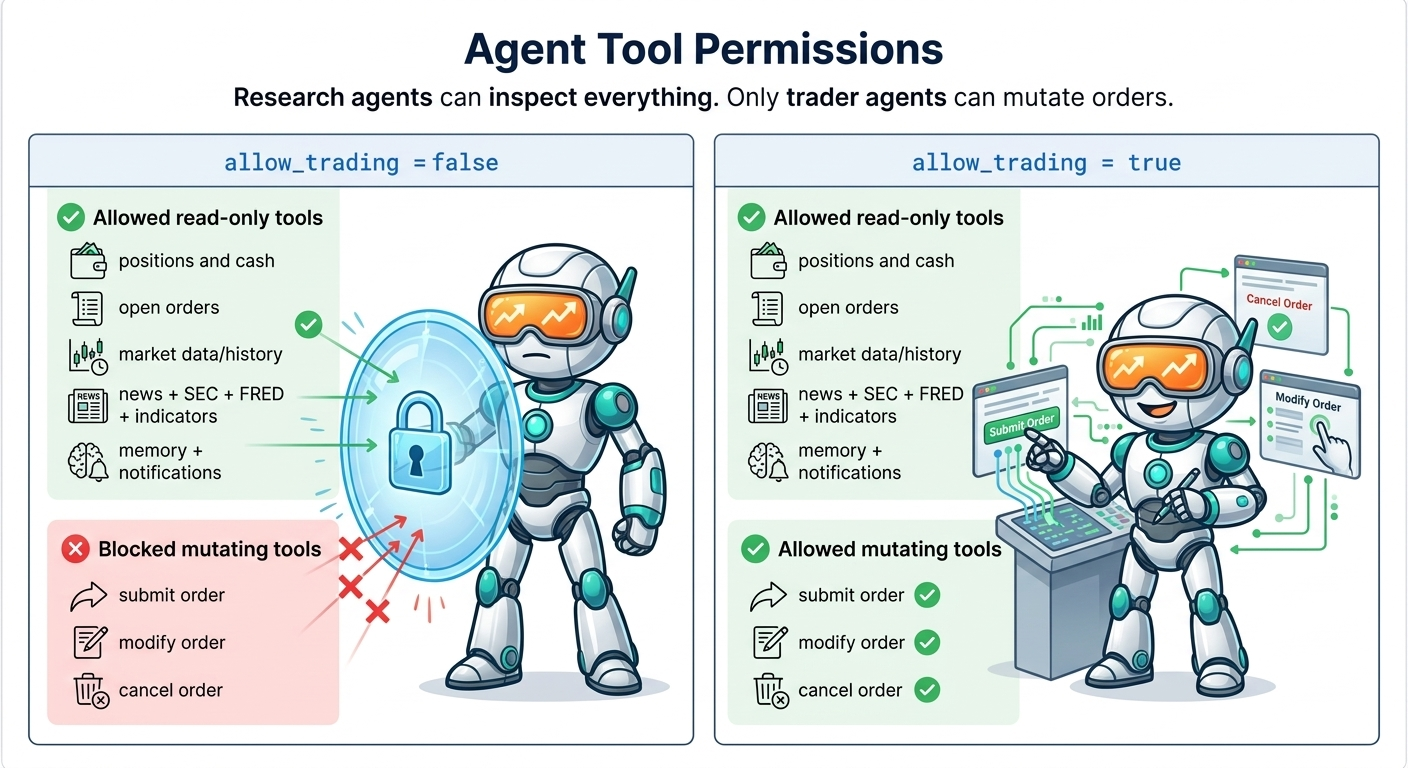
Use allow_trading=True only for the final agent that is allowed to place or
change orders. In an AI trading team workflow, that is usually the portfolio
manager or trader agent.
Network Permissions
The outbound network tools (http_request, read_document, rss_fetch, and every
browser_* tool) are off by default. Fetched pages are untrusted input, and
a network tool is the channel a prompt-injected page could use to send agent
context somewhere else. Keeping them out of the default set also keeps trading
agents focused on account and market tools.
Opt an agent in with allow_network=True:
self.agents.create(
    name="page_researcher",
    model="openai/gpt-6-luna",
    allow_trading=False,
    allow_network=True,
    system_prompt="Use http_request to read the supplied public page. Do not submit orders.",
)
Listing a network tool explicitly, for example
tools=[BuiltinTools.web.http_request()], is also an opt-in, but only for
the tools you list. allow_network=False removes network tools even when
they are listed. Give network access to the research agent that fetches pages,
not to the trading agent.
Order Readiness
Agent order tools are intentionally broker-like: LumiBot either submits the exact order requested or rejects it. It does not silently resize, clip, or normalize a requested order into a different order.
Before orders_submit_order or orders_submit_multileg can submit an
order, the agent must inspect the required account, open-order, and price
context in the same agent run:
account_portfoliofor cash and portfolio valuecomplete unfiltered
account_positionspagination for current holdingscomplete unfiltered
orders_open_orderspagination for active ordersmarket_last_pricefor the ordered symbol, ormarket_last_pricesincluding that symbol
If those checks are missing, the order tool returns an
ORDER_READINESS_REQUIRED error to the agent instead of submitting the order.
This is not a universal margin model. LumiBot does not try to enforce one
broker/country/asset-class leverage rule across stocks, ETFs, options, futures,
forex, and crypto. The readiness gate only prevents blind trading; sizing
judgment remains with the strategy and agent. A fresh injected account snapshot
satisfies the initial account and open-order checks only when all of its
completeness flags are true. After an order mutation, the agent must refresh
the account and open-order context before submitting another order.
Option orders ask for more. The agent prompt and the built-in
options-trading skill tell the agent to call account_portfolio,
account_positions, and orders_open_orders in the run before any option
order, even when the injected snapshot is complete, because an option package
depends on exact signed contract positions and pending packages. The skill also
tells the agent to apply only the expiration, delta, and width limits the user
or active rules state, and to measure deltas with the Greek tools instead of
declining from strike distance alone. If one listed expiration has unavailable
Greeks or quotes, the agent checks other listed expirations allowed by those
constraints before declaring that data is unavailable. All legs are selected
and verified for the chosen structure. Use one expiration when the structure
requires it. Calendar legs may use distinct listed expirations only when the
user or active rules allow them, without relaxing those limits.
For stocks, a pending exit already owns that position change. A due exit condition or a limit away from the current market does not authorize replacing it. The agent changes an existing order only when the user’s rules explicitly require that change. The final decision explains how the observed pending quantity already covers the intended position change and why another order would duplicate it. Lookback rules use the requested number of the latest completed bars. The reported indicator and date window must match the selected tool result.
Opening an option position (buy_to_open, sell_to_open, or a plain buy or
sell that does not reduce a held contract) also requires a successful
options_get_chain for the underlying in the same run. Without it the order
tool returns ORDER_READINESS_REQUIRED. Expiration and delta helpers only
return candidates; the chain shows what is listed. Closing a held contract does
not need the chain.
Market-price tools:
market_last_priceaccepts one tradable symbol per call.market_last_pricesaccepts a JSON-friendly symbol list (symbolsorsymbols_json, cap 150) and returns last prices at the current runtime datetime plus available/missing symbol lists. Prefer this when scanning a provided universe.market_load_history_tablestill loads one symbol per call; load finalists after the batch scan.Broker price data often has no market indexes (Alpaca has no VIX). When a price tool has no data for an index such as VIX, VXN, OVX, GVZ, SPX or DJIA, its result includes a
fred_hintnaming the FRED series with the daily close (the VIX isVIXCLS).get_fred_latestreturns only what was published by the strategy date, so it is safe in backtests.
Market And Account State
These tools let agents understand what the strategy already knows:
current datetime
cash and portfolio value
positions
open orders
historical bars and market data
account and broker context available to the strategy
These tools are read-only. They remain available even when
allow_trading=False.
Options And Multi-Leg Orders
LumiBot exposes generic options capabilities to every agent:
options_get_chainoptions_get_strikesoptions_get_greeksoptions_find_strike_for_deltaoptions_find_expirationoptions_evaluate_marketoptions_calculate_multileg_priceoptions_check_spread_profit
The tools retrieve data through the configured LumiBot broker or backtest data source. They do not select a named options strategy or choose its legs. The agent must select an available expiration, exact listed strikes, quantities, and actions from the returned evidence.
options_find_expiration finds a listed expiration on or after a target date
using min_days and/or target_date. options_check_spread_profit
estimates multi-leg P&L percentage from exact legs and the opening cash cost.
orders_submit_multileg submits two or more exact option legs as one atomic
multi-leg order. Opening actions are buy_to_open and sell_to_open.
Closing actions are buy_to_close and sell_to_close. Signed net prices
are positive for debits and negative for credits.
If the active broker does not support atomic package submission, LumiBot rejects the request before submitting any child leg. A multi-leg request never falls back to independent orders.
After submission, agents can call orders_get_status or
orders_wait_for_terminal to verify identifiers. Never treat a submitted
status as a fill unless is_filled is true.
account_positions and orders_open_orders return compact, deterministic
pages with 50 records by default and at most 100 per call. Every response
includes total, matched, returned, omitted, complete, and next-offset metadata.
When complete is false, omitted records still exist; continue through the
remaining unfiltered pages before treating the account view as complete.
Every page also carries a content-derived snapshot_id. Full-account
readiness accepts a page sequence only when every page has the same identifier;
if positions or open orders change between calls, restart pagination at offset
zero.
Both tools support exact symbol, asset type, expiration, strike, and option right filters. This allows an agent to find a specific contract even when it falls outside the first visible page. Open-order filters also inspect compact multi-leg child contracts. A targeted lookup proves whether that contract is present, while complete unfiltered pagination is still required for full order-readiness.
Position entries include the exact compact asset identity, signed quantity, closing side and quantity for options, and available average fill, current price, market value, and P&L fields. Missing optional values are omitted rather than represented as zero. The injected runtime snapshot uses the same compact position and order representation as the tools, so inspecting the account does not unexpectedly expand raw broker or internal Python objects into model context.
Technical Indicators
Indicator tools expose LumiBot’s indicator system to agents:
list_indicatorsget_indicatorget_indicators
Indicator input is restricted to rows at or before strategy time, not just the returned value. Noncausal parameters are rejected. Completion of a timestamped bar follows the selected data source’s contract; see Indicators.
Use get_indicators with requests_json for independent parameters and
timeframes. Each of up to 50 requests needs a unique id and indicator;
optional parameters is an object and timestep overrides the batch default:
get_indicators(symbol="SPY", requests_json='[
  {"id":"sma50","indicator":"sma","parameters":{"length":50}},
  {"id":"sma200","indicator":"sma","parameters":{"length":200}},
  {"id":"minute_rsi","indicator":"rsi","timestep":"minute","parameters":{"length":14}}
]')
Results retain their request IDs. A failed calculation does not hide other
results; complete=false means at least one request failed. The original
indicators=["rsi", "macd"] interface remains supported for default parameters.
Do not combine indicators and requests_json in one call.
Request ids, indicator names and timesteps must be nonempty strings of at most
128 characters. Malformed envelopes fail before data retrieval.
Testing and eval costs
The source release eval runner uses a durable, per-model-call spending ledger. Actor calls, judge calls and continuations reserve their maximum cost before inference. Missing usage after a failure retains its reservation across resumes; it is not counted as a free call. This opt-in release-test policy does not alter ordinary strategy execution or impose a new provider account limit.
Freshness remains 90 days for compatible evidence. Runtime, indicator, broker
and installed SDK changes invalidate the relevant shared fingerprint. See the
repository’s docs/AGENT_EVALS.md for the ledger and resume contract.
SEC Fundamentals And Filings
SEC tools use public SEC EDGAR data directly and cache responses locally. They do not require an API key.
Common tools include:
get_income_statementget_balance_sheetget_cash_flowget_company_factsget_filingssearch_filingget_filing_document
get_filings for a symbol the SEC ticker map does not list (ETFs, foreign listings, crypto, private names) returns an empty filings list with available: false and reason: "no_sec_cik" instead of an error. The absence is reported, never filled in.
Backtests gate filings by filed date or acceptance timestamp, so an agent cannot
read a filing before it existed. Use search_filing before
get_filing_document when the filing is large and the agent only needs a
specific section.
HTTP, Documents, And RSS
These tools require the network opt-in described in Network Permissions.
http_request is the general outbound web/API tool. It supports GET,
HEAD, OPTIONS, POST, PUT, PATCH, and DELETE with query
parameters, JSON, form, raw, and multipart bodies. Responses are structured and
size-bounded; binary bodies are base64 encoded. A strategy-level client retains
cookies across calls and validates the destination again after every redirect.
Authentication is supplied through named, host-scoped credential profiles rather than placed in agent prompts. Profiles support bearer, basic, API-key, custom-header, cookie, and client-certificate authentication. Secrets are injected only for matching hosts and are not returned in tool output. The default network policy blocks loopback, private, link-local, reserved, and cloud-metadata destinations; a trusted internal host must be explicitly allowlisted by the application that creates the client. This guard preserves the full HTTP method set while preventing an untrusted page or prompt from silently reaching internal infrastructure.
read_document reads any file or page at a URL: PDF, Word (.docx),
Excel (.xlsx), CSV, tab-separated text, JSON, HTML, and ZIP archives (it
lists and reads every file inside). An HTML page comes back as text plus every
link on it, so an agent can find a report on a website and follow its link.
find keeps only the lines that contain a word, and start with the
returned next_start pages through long text. Every table in the file (a
CSV, an Excel sheet, a table file inside a ZIP) is loaded for duckdb_query,
so the agent filters and adds up rows with SQL instead of by hand. A ZIP that
unpacks to more than 100 MB is refused; the same limit applies to Word and Excel
archives. Tables with the same label receive distinct names so earlier reads
remain queryable. A malformed CSV/TSV retains its text and returns
table_error instead of silently dropping rows. No tool is built for one website: the
Nancy Pelosi Stock Trading Bot reads the House Clerk’s yearly ZIP
index and PDF reports with read_document. The web-documents skill tells
agents how, including the backtest rule: use each document’s own date and skip
anything dated after the backtest time.
self.agents.create(
    name="researcher",
    allow_trading=False,
    allow_network=True,
    system_prompt="Read https://example.com/reports/2025.zip and total the amounts by ticker.",
)
rss_fetch reads RSS and Atom feeds through the same network and credential
policy. It normalizes feed metadata and entries and supports conditional
requests with ETag and Last-Modified validators.
Use these built-ins for normal APIs and feeds. Use Stateful Browser Tools when a source requires JavaScript rendering, a login flow, multiple tabs, or stateful interaction.
FRED Macro Data
FRED tools expose macroeconomic series to agents:
list_fred_seriesget_fred_seriesget_fred_latestget_fred_snapshot
Set FRED_API_KEY so LumiBot can request FRED/ALFRED vintage observations
using realtime parameters. LumiBot’s built-in FRED tools do not use public CSV
fallbacks; macro tool output should either come from the official API or fail
clearly.
News
If the active broker is Alpaca, LumiBot can use that broker connection for
Alpaca/Benzinga news. If the active broker is not Alpaca, configure the
news-only ALPACA_NEWS_API_KEY / ALPACA_NEWS_API_SECRET env vars instead.
Generic Alpaca broker env vars are intentionally not used for news-only access,
so news credentials do not confuse broker selection for Tradier, IBKR, or other
brokers. In backtests, news tools should use the strategy datetime as the cutoff
so the agent cannot read future headlines.
DuckDB And Documentation Search
Agents can use DuckDB for structured analysis instead of asking the model to reason over raw tables inside the prompt. Documentation search tools let the agent inspect LumiBot usage patterns when it needs framework guidance.
Memory
Memory tools write local SQLite and Parquet artifacts so agent decisions remain inspectable:
remembersearch_memoryremember_proposalremember_risk_noteremember_decision(trading-capable agents only)remember_lessonopen_thesisupdate_thesisclose_thesis
Memory works in both backtests and live runs. In a backtest, memory is part of the run artifact trail. In live trading, it can preserve context across iterations and restarts when the same memory directory is reused.
Use remember_proposal for research ideas and remember_risk_note for
bear-case notes. Use remember_decision only for the final trading decision.
When orders_submit_order submits an order, Lumibot automatically records an
order.submitted memory event. Memory events and retrievals include
agent_name and model_call_id when they came from an agent tool call.
Notifications
notify_user sends through configured notification providers. Telegram is
the first built-in provider. Backtests keep notifications disabled by default,
but you can explicitly opt in when testing notification behavior.
Point-In-Time Safety
The built-in research tools are designed around backtest/live parity:
indicators return current-bar values only
SEC filings are gated by filed or accepted datetime
FRED backtests use vintage observations when
FRED_API_KEYis availablenews tools use the strategy datetime as the cutoff
Evidence packets retain each returned dataset ID beside its source, dates and query window. Attribute an aggregate to a tool only after the tool returns that aggregate; rows of individual prices are not a calculated average. When selecting document links in a backtest, filter by publication date before sorting or limiting the rows, then inspect the date before opening each link. Establish this eligibility before reading the linked document; opening a later document and then discarding its contents has already crossed the time boundary.
For opening option packages, verify the standard leg topology before pricing. A reversed spread changes the structure; recheck buy/sell sides and strikes when the calculated debit or credit contradicts the intended package. Closing sides continue to come from actual signed positions.
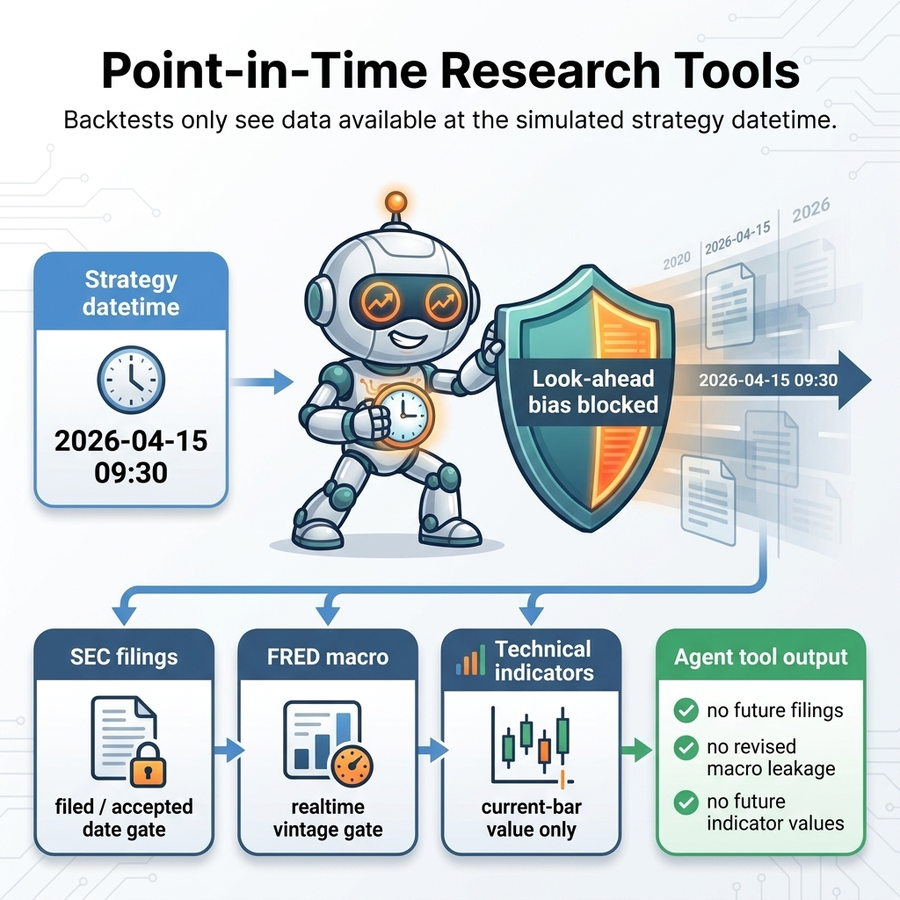
This lets agents research during a backtest without accidentally looking into the future.
Managed model families
With managed AI configured, a strategy may select a reviewed family such as
google/gemini-pro, google/gemini-flash, google/gemini-flash-lite or
openai/luna. The gateway resolves that family to one exact model on the
first request. LumiBot keeps that model for the entire decision, including
native tool continuations. Later decisions may use a newly reviewed mapping.
For reproducible historical experiments, use an exact model id instead.
Family names require a compatible managed gateway. They are not aliases to send directly to a provider. BYOK execution continues to require an exact provider model id; LumiBot does not ignore personal keys or switch billing routes when authentication fails. Historical indicator windows —————————-
get_indicator and each get_indicators request accept optional start
and end ISO timestamps with timezone offsets. Supply both together. The
inclusive end cannot exceed strategy time. Only bars inside the window are
used, including warmup; an insufficient window returns null, not a zero signal.
For example, use separate result IDs and January/February bounds for independent
monthly calculations. Source adapters retain ownership of bar completion.